
Remove negative Amazon reviews that violate policy
A negative Amazon review can be taken down only when it breaks one of Amazon's Community Guidelines — an honest review stays, and no service can change that. This free extension reads any review on your listing the way a lawyer reads a case file, names the guideline it breaches, and drafts the removal appeal in about 30 seconds. Our legal team filed over a thousand Amazon review appeals by hand before a line of AI was written, and every ground Amazon accepts went into SalesFortuna Review Appeal.
Chrome Web Store · No signup required · 10 Amazon marketplaces · Removal services charge about $250 per review
Extension Privacy Policy·Extension Terms·Extension Support
How it works
One unfair review shouldn't sink your rating
Here's exactly what the extension does - shown on the Amazon screen you already know. Spot the review that's hurting you, prove it breaks Amazon's rules, and file the appeal in one click.
Honestly garbage quality, fell apart in a week. The “NovaRest” one is way better and half the price - just get that one instead. This seller is a total scam, don't waste your money!!
Every appeal is built from thousands of our real review-removal cases. We A/B-test the phrasing against Amazon's responses, and the AI drafts the version most likely to win - in Amazon's own policy language.
You don't have to keep checking. We track the review and email you the moment Amazon takes it down - proof your appeal worked.
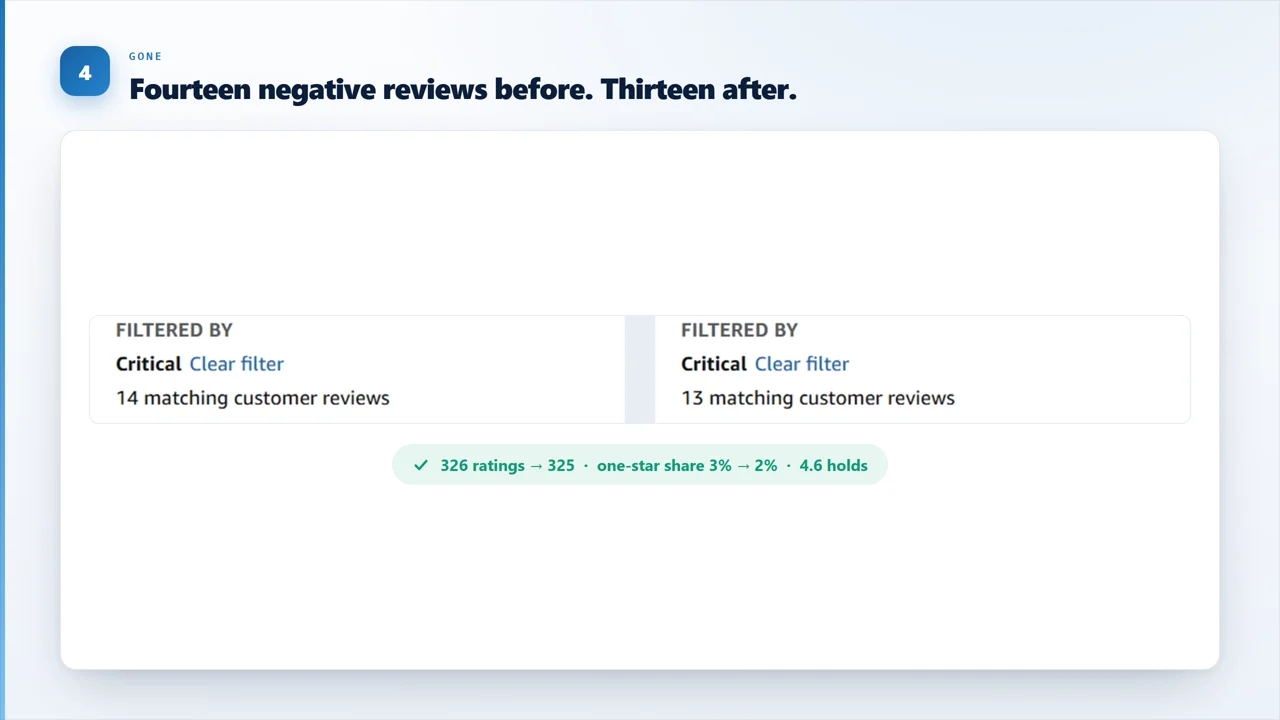
Screenshots are unedited. The blur covers the reviewer’s name and the product title, nothing else.
- 1YouHighlight the review
- 2AIChecked vs Amazon policy
- 3AIAppeal written for you
- 4ExtensionReport Abuse auto-filled
- 5We watchEmailed when it's gone
See which of your negative reviews may qualify for removal — free, on your own listing.
Add to Chrome — FreeWhat it detects
Negative Amazon reviews that may be eligible for removal
The extension reviews the text against common Amazon Community Guidelines violations and helps you understand whether the review may qualify for removal.
- Off-Topic
Off-topic reviews about shipping or seller service
Negative reviews about delivery, packaging damage, or seller service may belong in seller feedback rather than product reviews.
e.g. "Package arrived crushed - terrible seller" on a product listing
- Inappropriate
Abusive, offensive, or inappropriate reviews
Reviews with profanity, hate speech, personal attacks, threats, or graphic content may violate Amazon's review rules.
e.g. Personal insults directed at the brand or other reviewers
- Fake / Incentivized
Fake, paid, incentivized, or competitor reviews
Reviews posted in exchange for cash, discounts, free products, or competitor activity may qualify for an Amazon review removal appeal.
e.g. Reviews from review clubs, or suspiciously repetitive 1-star waves
- Other Violations
Spam, duplicate, or irrelevant reviews
Duplicate text, promotional content, external links, and irrelevant review content can be signs of a policy violation.
e.g. Identical review text posted across dozens of listings
Amazon can remove a review on any of these grounds. A negative review is not removable for being negative - it is removable when it breaches one of them, and the appeal has to name which:
- Seller, order, or shipping feedback - belongs in seller feedback, not a product review
- Comments about pricing or availability - not about the product itself
- Profanity or harassment - abuse aimed at the brand, staff, or other reviewers
- Hate speech - attacks on protected groups
- Sexual content - explicit material in review text or images
- Private information - names, addresses, order numbers, phone numbers
- External links - links out to other sites or listings
- Ads, promotional content, conflicts of interest - competitors, employees, friends, or family
- Compensated reviews - cash, discounts, free product, or review swaps
- Repetitive text or spam - duplicated wording, pictures built from symbols
- Plagiarism, infringement, or impersonation - copied content or a faked identity
- Content in an unsupported language - not a language the marketplace supports
- Illegal activities - content promoting unlawful use
- Reviewer below the eligibility threshold - Amazon requires $50 spent on the site in the last 12 months
Why removing negative reviews matters
Negative Amazon reviews can hurt conversion rate, PPC, and organic rank
Every click you buy with Amazon PPC sends shoppers to your listing. If policy-violating negative reviews are lowering trust, your conversion rate drops and your ad spend works harder for fewer sales.
Removing a review is only legitimate when the review breaks Amazon's rules. SalesFortuna Review Appeal helps you focus on reviews that may actually be eligible for removal.
Check a negative review against Amazon's Community Guidelines right on your listing — free.
Add to Chrome — FreeThe safe way
Remove negative reviews the legitimate way
SalesFortuna helps you identify policy violations and submit Amazon's official report flow. It does not help delete legitimate negative feedback.
| Method | SalesFortuna Review Appeal | "Pay-to-delete" services | "Amazon insider" services |
|---|---|---|---|
| How it works | AI flags real policy violations; you file Amazon's own Report form. | A third party "removes" reviews by undisclosed means. | Claims private Amazon contacts pull reviews. |
| Amazon ToS | Compliant: official report flow. | Manipulation risk and opaque methods. | Account-access abuse or bribery risk. |
| Suspension risk | None when you act within policy. | High. | Severe account-ban risk. |
| Cost | Free. No per-review fee. | $250 per review is the going rate; €169 at one EU provider. | $997-$2,500 per month on retainer. |
| Speed | Appeal in about 30 seconds. | Days to weeks. | Unpredictable. |
| You stay in control | You review and submit. | Black box. | Black box. |
| Legit-but-negative review | Honest: only policy-violating reviews qualify. | "Removes anything" red flag. | "Removes anything" red flag. |
Free limits
3 Amazon review checks and 1 SEO insight per day, no signup
Start free in the Chrome extension. Connect a SalesFortuna account when you need higher daily review checks and SEO listing insights.
No account required. Use it directly on Amazon listing and review pages.
Connect an account anytime for higher daily limits.Need more checks?
Account limits scale with trial and paid SalesFortuna plans.
Behind the trial is the SalesFortuna dashboard: true profit per product, ad performance and review checks in one place.
Bonus: review insights
Use negative reviews to improve your listing
After checking whether negative Amazon reviews may qualify for removal, use the extension to analyze 1-3 star feedback and find listing improvements.
- Themes
Top complaint patterns
The most frequent pain points across 1-3 star reviews, ranked by volume - so you know exactly what's driving buyer dissatisfaction.
- Copy
Listing copy changes
Targeted edits for your title, bullet points, and A+ content based directly on what reviewers expected but didn't find.
- SEO
Keyword opportunities
High-intent search terms buried in negative feedback that your current listing isn't capturing - ready to test in your PPC campaigns.
- Summary
Executive summary
A concise, shareable brief of the full analysis - built for your team, agency, or product decision log.
SEO listing analysis costs 10 credits and requires a connected SalesFortuna account.
No signup needed to start: the extension is free.
Add to Chrome — FreeNegative review removal questions sellers ask first
Remove negative reviews. Improve conversion.
Find policy-violating Amazon reviews and prepare the appeal in seconds.
Install the free extension, open your Amazon listing, and check a negative review against Amazon's Community Guidelines right on the page.
Extension is free · Dashboard trial is 30 days, no credit card